![PS_Logo_Stager_Orange.png]](https://support.pestshare.com/hs-fs/hubfs/PS_Logo_Stager_Orange.png?height=50&name=PS_Logo_Stager_Orange.png)
Learning Objective
Pest Share makes it easy for residents to get pest control services without requiring a login or account. The entire process — from submitting a request to scheduling service — is handled online in just a few minutes. Property Managers can also submit requests on behalf of residents or for vacant properties.
Quick Reference
- Access: pestshareservice.com -no login or password is required
- Languages: English and Spanish — Spanish speakers are auto-assigned a Spanish coordinator
- Annual Services: Up to 4 service requests per 12-month period per property
- Warranty: 30-day warranty from the date of eradication (per service)
- Support: Client Success Manager available to assist property managers directly
- Navigate to Pest Share's website: www.pestshareservice.com
- At the top right corner, choose "Request Pest Control", or in the center of the landing page, choose "Start my Request"
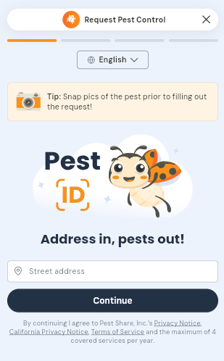
- This will launch the Pest[ID] Submission Portal
Step 2 — Identify the Property
- The resident enters the property/address information and confirms their selection.
- What happens if the address is not found?
Address Not Found
On the rare occasion an address can not be found in our system, the property manager or CSM should explain the appropriate process rather than having the resident simply abandon the request.
CSMs should understand:
- Why an address might not be found.
- Pest Share needs to investigate.
- Selecting the Address Not Found Tab.
- What information should be verified.
- What happens next.
Step 3 — Identify the Pest
-
The resident selects the pest/problem either using the Pest Library, by dictating their pest issues, or by typing in the pest issue they are experiencing.
- Describe how many pests you're seeing and where in the home they are located.
Step 4 — Upload a Picture
A picture is required.
Explain:
- At least one clear picture of the pest issue is required.
- The photo will be used to identify the correct pest and verify the infestation positively.
- The service provider will also review the pest image.
- If the resident or property manager cannot provide an appropriate photo, toward the end of the submission process, they can explain why they need an exception to this request
Step 5 - Review Your Summary Page:
- A summary of your request will be displayed, including all selected pests.
- Any non-covered pests (e.g., fire ants) will appear here with a quoted price based on average local service costs.
- You can remove non-covered pests from the request before submitting to avoid charges.
- If paying for a non-covered pest, you'll enter your credit card here — Pest Share does not store payment info.
Step 6 — Covered vs. Non-Covered Pest
-
If the pest is covered, the submission continues through the process.
-
If the pest is not covered, the resident may encounter different paths depending upon the pest and the direction the property management has chosen.
Step 7 — Submit
- Review your request, then click Submit.
- Review the request submission confirmation page, which will include your request confirmation number and will also track the number of services you have requested. Take a moment to jot down the confirmation number.
- You'll receive an automated confirmation email immediately following the submission.
- A second email will follow with your assigned local service provider's name and contact info.
- The provider typically reaches out within 2 business days to schedule your appointment.
- Be sure to watch for phone calls from unfamiliar phone numbers, and watch your SPAM.
Step 8- After Submission - Managing your service
- You'll be introduced to a Pest Share Service Coordinator in the second email.
- Reply to that email to reschedule, ask questions, or cancel — or contact the provider directly.
- Your 30-day warranty begins on the date of eradication (not the request date).
- Follow-up treatments for severe infestations (e.g., bedbugs, cockroaches) are included within the same work order.
SPECIAL SITUATIONS
Property Manager Submitting on Behalf of a Resident
Property Managers can submit a service request directly on behalf of a resident or for a vacated unit if the property is actively enrolled. Simply fill out the form with all of the property manager's or CSMs contact information or all of the resident's contact information. This is useful when a tenant is unable to submit on their own or when the property is between occupants. The contact information should be consistent with just one person.
Wood-Destroying Organisms (WDO) & Structural Pest Requests
Pests such as termites, carpenter ants, carpenter bees, rodents that have caused structural damage, or wild animals require a manager-approved inspection before any work begins.
- Process: Pest Share forwards the inspection quote and photos to the Property Manager
- Approval Window: 3 business days to approve, consult the property owner, or seek a second opinion
- No Response Needed: If approval isn't received in time, the request will be cancelled and will need to be submitted again
Coverage Quick Reference
- Interior — Home interior + attached structures (garage, lanai, sunroom, shed with flooring). Included in standard service.
- Exterior — Outdoor areas for pests originating outside (e.g., fleas from pets). Included when applicable.
- Follow-up Treatments — Additional visits for severe infestations (bedbugs, cockroaches). Counted as same work order.
- Warranty — 30 days from date of eradication. Covers reinfestation during the window.
- Non-Covered Pests — Fire Ants, and others outside the plan. Quoted & resident pays directly.
- WDO / Structural — Termites, carpenter pests, structural rodents, wild animals. Resident will be informed that "Further Review Is Needed". These pest requests require an inspection and property management approval of the proposed treatment plan.
Helpful Tips for Property Managers
- 📸 Photo Tip: Always encourage residents to upload a clear, close-up photo. This is the single most important step for fast, accurate service. Without it, misidentification is common — especially among roach species and ant types that require completely different treatments.
- 🌎 Spanish Speakers: When a resident submits in Spanish, Pest Share automatically assigns a Spanish-speaking coordinator for all communications — no extra steps needed.
- 📦 Multiple Pests: Residents can include up to 3 pest types in a single request. All treatments under one work order count as just one of the four annual services.
- 🏚️ Vacant Properties: For properties without a resident present, use the Exception button when a pest photo isn't available. This keeps the request moving without delays.
Need Help?
Your Client Success Manager is available to:
- Walk residents through their first service request by phone
- Answer pest or coverage questions on your behalf
- Support elderly or tech-averse residents who need extra guidance
WATCH - PEST REQUEST SUBMISSION PROCESS WITH TRAINER NARRATIVE
TRAINING VIDEO - PROPERTY MANAGERS - PEST REQUEST SUBMISSION DEMO
TRAINING VIDEO - RESIDENT - PEST REQUEST SUBMISSION DEMO
Support Resources
- Help Center: support.pestshare.com
- Service Request Questions: servicerequests@pestshare.com
- Submit a Request: pestshare.com
Pest Share Academy | Knowledge Base Article | pestshare.com